Evaluating TOON in a Real-World Scenario
Evaluating TOON in a Real-World Scenario
Token-Oriented Notation (abbreviated as TOON) is the concept of rewriting JSON in such a way that fewer characters, and thus fewer tokens, are generated. The concept is explained in more detail at https://toonformat.dev/, and a simple example is shown below. When querying the systemd-mcp server for all inactive services on a system, the output without TOON is as follows:
{
  "users": [
    { "id": 1, "name": "Alice", "role": "admin" },
    { "id": 2, "name": "Bob", "role": "user" }
  ]
}
This representation, which uses 119 characters, is reduced to 53 characters when using TOON:
users[2]{id,name,role}:
  1,Alice,admin
  2,Bob,user
See also the systemd example at the end of this post.
Because token savings are a direct way to reduce AI inference costs, improve response times (by decreasing latency), and allow better utilization of the context window, this approach seems like an easy win. Still, changing the fundamental response format of the MCP server may also have downsides. Therefore, I decided to perform some real-world experiments to determine if there are any downsides, the most severe of which would be incorrect responses from the LLM or an increased number of tool calls that nullify the token savings.
MCP Server and Implementation
As I was working on the systemd-mcp server (https://github.com/openSUSE/systemd-mcp), I decided to use this project as a base.
Since the standard Go implementation of MCP (https://github.com/modelcontextprotocol/go-sdk) does not support TOON yet, I used toon-context-mcp (https://github.com/aj-geddes/toon-context-mcp). The integration is relatively straightforward: the primary payload of an MCP tool response is a text field containing the internal structure marshaled as JSON. Thus, this text field is now marshaled using TOON, while the outer JSON structure used for communication between the MCP server and client remains intact.
Testbed
Creating the testbed was slightly more involved and required some refinement. First, the MCP server requires a real, live-running systemd process to connect to. A reproducible and secure solution is to run it inside a virtual machine (VM). The OpenTofu (open-source Terraform) configuration, available at https://github.com/mslacken/EvalToon/blob/main/tofu/leap-cloud.tf, provisions an openSUSE Tumbleweed cloud image that is configured via cloud-init.
A notable side quest was deploying the systemd-mcp binary to the VM. Compiling it on the VM itself would consume excessive CPU cycles and time, and using the RPM package was not viable because the TOON changes had not been pushed upstream yet. The canonical way to copy a binary to a VM would simply be to copy the file using scp. However, I chose not to use this approach because the SSH server was disabled, and I wanted to assign fixing the SSH service as a task for the LLM itself. This left several possibilities (among others):
- Using a 9p or similar shared filesystem
- Using a read-only filesystem containing only the binary
Since the 9p solution requires absolute paths in the cloud-init configuration, I chose to create a second virtual disk containing the pre-compiled binary. Upon booting the VM, the setup script uses dd to dump the binary into the root filesystem.
The setup script also stopped the SSH service, creating the broken configuration that serves as our “FIX” task testbed.
Agent
To connect the MCP server to the LLM, which was hosted on a remote Ollama instance, I used the Google Agent Development Kit (ADK) (https://adk.dev) to manage the agent execution loops.
Although ADK supports external logging, it can also log events to a local SQLite database. This database is critical for our analysis, allowing us to extract the relevant metrics: the number of prompt (input) tokens presented to the LLM, candidate (output) tokens generated by the LLM, the number of tool calls, and the total number of Ollama API calls.
LLM
The external Ollama instance ran a gemma4 model with 31.3B parameters and Q4_K_M quantization, with a temperature of 1.0 and a context window of 131,072 tokens.
Experiments
The following three queries were presented to the LLM:
- “Check if sshd is running” (labeled as CHECK)
- “List me running services on the system and which services can be started” (labeled as LIST)
- “I can’t login, fix this!” (labeled as FIX)
The first two tasks are relatively simple, primarily establishing baseline performance and token usage. In contrast, the final query (FIX) requires a multi-step troubleshooting approach with several tool calls, testing how TOON performs in a complex, real-world agentic scenario.
For each query, I conducted 30 independent runs with and without TOON enabled.
Results
The results are summarized in the table below:
| Query | Mean Prompt Tokens | Median Prompt Tokens | Mean Generated Tokens | Mean Tool Calls |
|---|---|---|---|---|
| CHECK | 10,621 | 11,793 | 258 | 1.70 |
| CHECK_TOON | 10,337 | 11,755 | 239 | 1.63 |
| LIST | 10,827 | 12,333 | 1,747 | 2.07 |
| LIST_TOON | 11,846 | 12,364 | 1,751 | 2.10 |
| FIX | 36,738 | 26,735 | 871 | 6.63 |
| FIX_TOON | 32,466 | 26,816 | 766 | 5.97 |
As can be seen from the table, using TOON reduces both the prompt tokens presented to the LLM and the candidate tokens generated by it. It is somewhat surprising that using TOON consistently leads to fewer generated tokens, suggesting a trend where the length of the LLM’s output correlates with the volume of the input context.
For the simple query (CHECK), where the LLM is only tasked with checking if SSH is running, using TOON does not yield a significant difference. This is because the vast majority of the tokens are consumed by the system prompt and the schemas/descriptions of the available tools.
For the service listing query (LIST), which outputs a large volume of systemd units, TOON performed slightly worse. This was due to a minor increase in the mean number of tool calls during TOON runs, which subsequently increased both prompt and generated tokens.
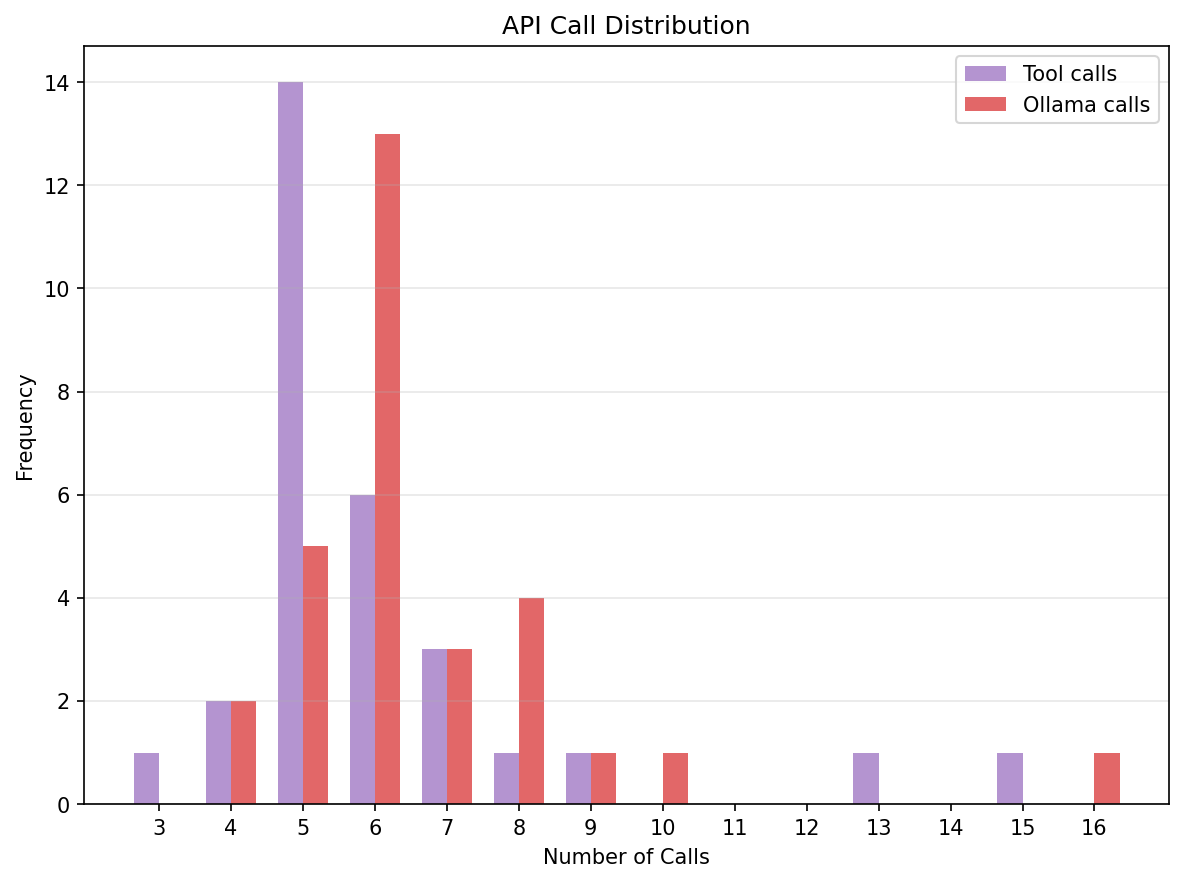
Figure 1a: Number of tool and Ollama calls of the FIX task (with outliers)
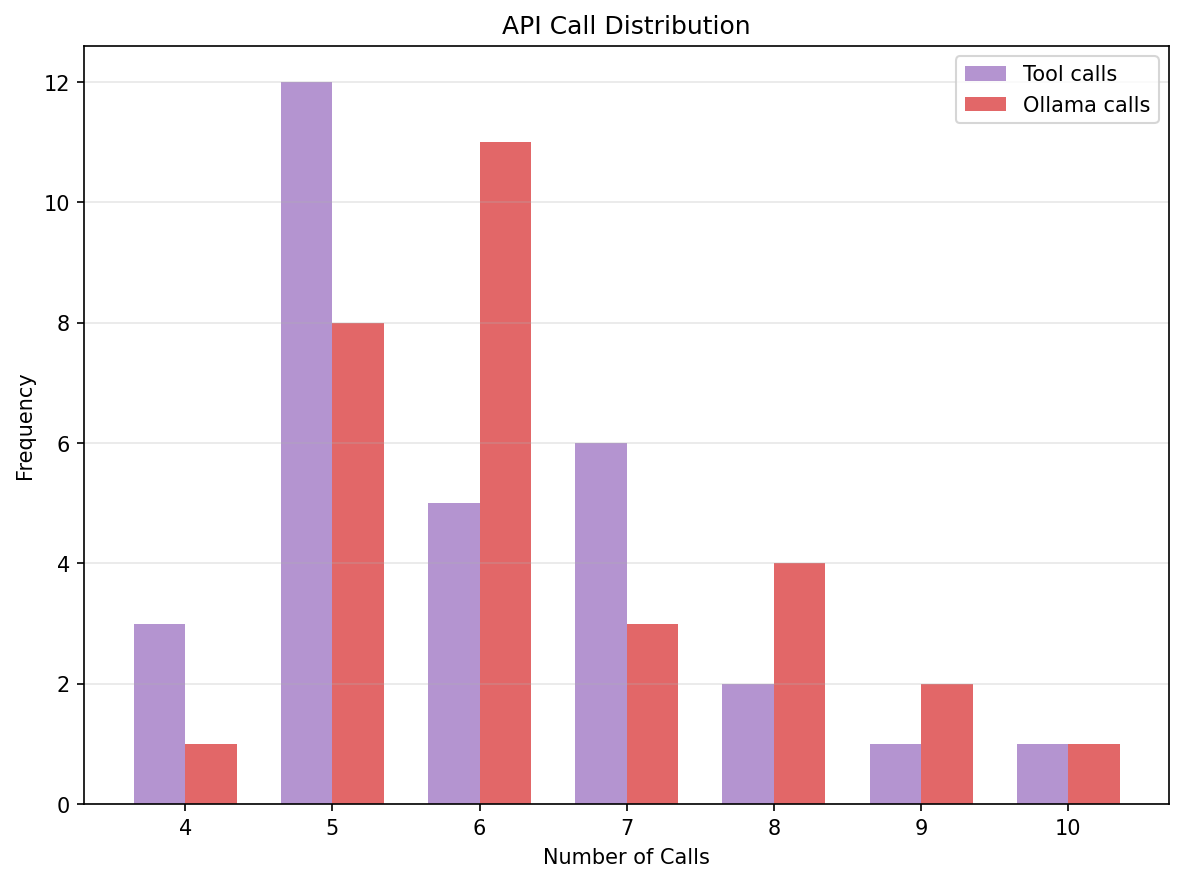
Figure 1b: Number of tool and Ollama calls of the FIX_TOON task (without outliers)
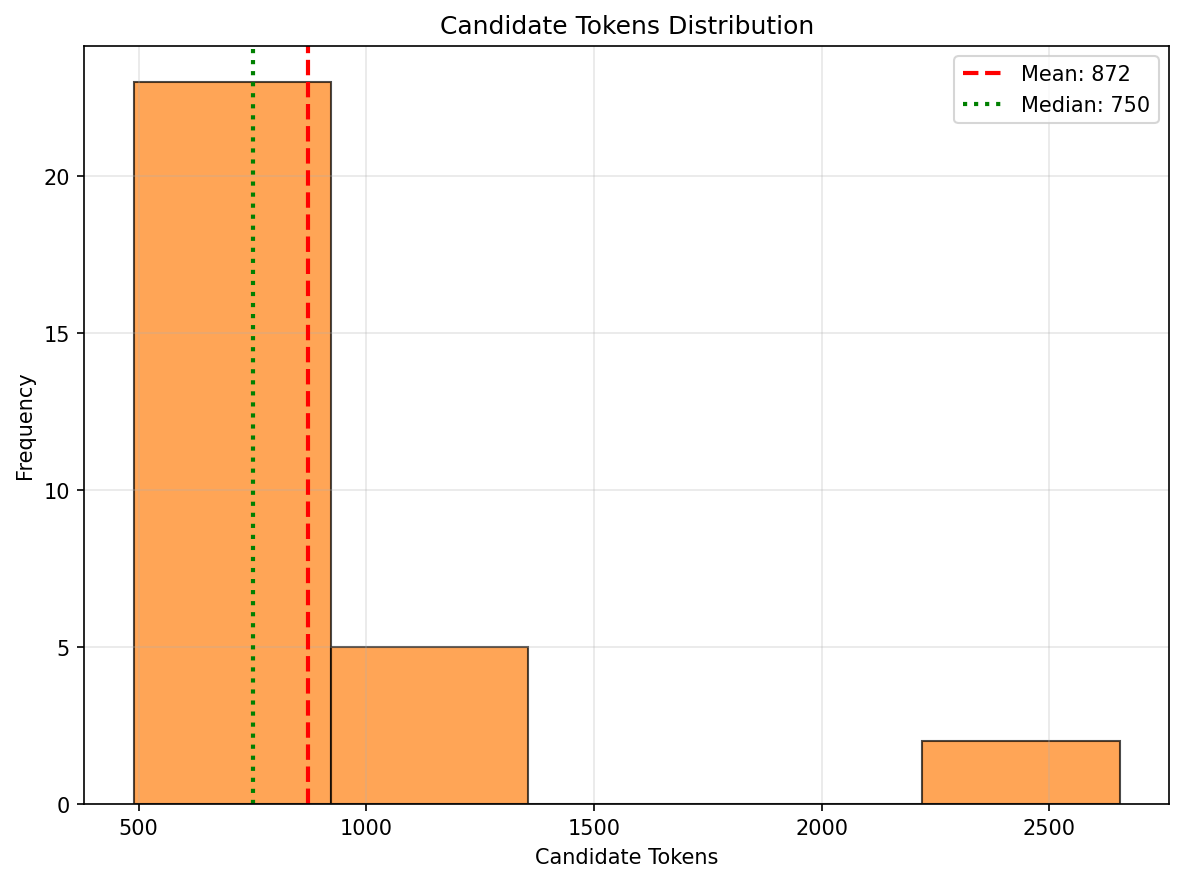
Figure 2a: Number of generated tokens for FIX (outliers visible)
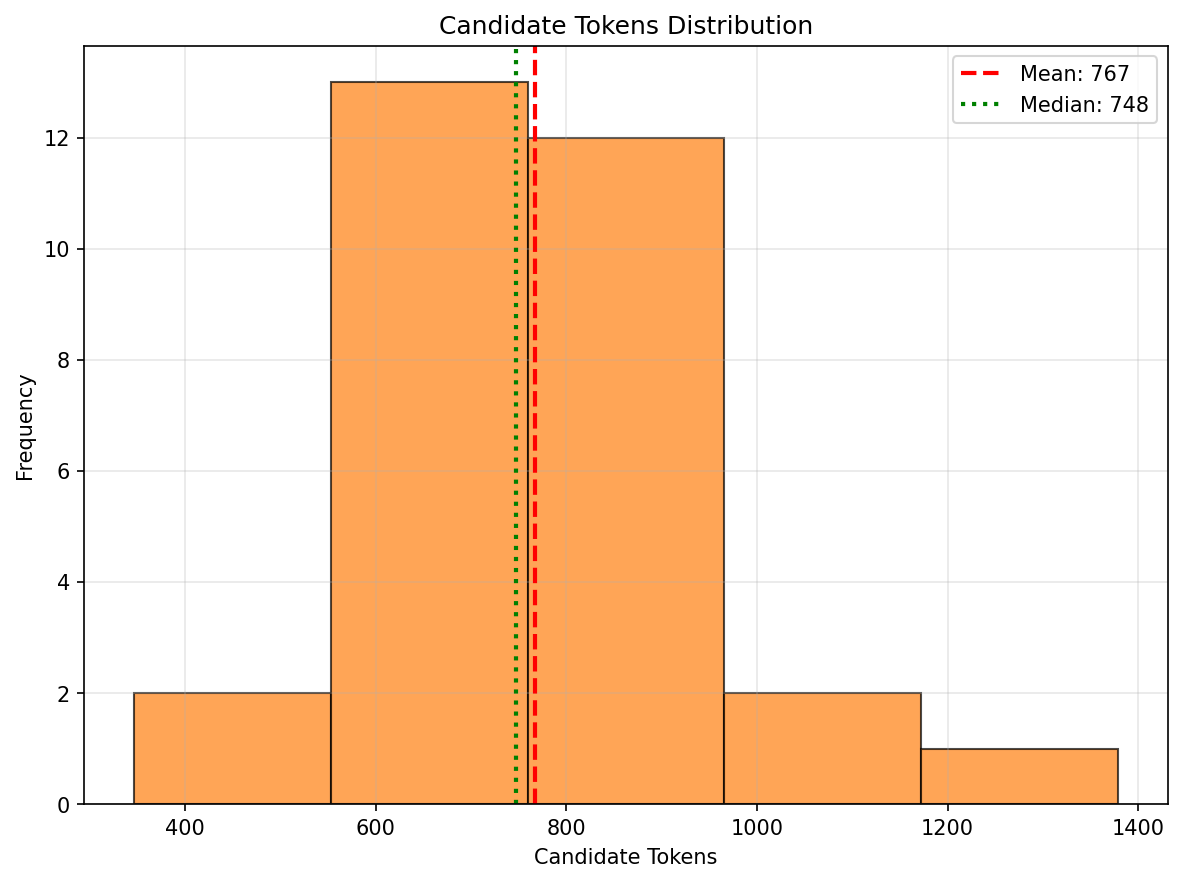
Figure 2b: Number of generated tokens for FIX_TOON (more compact distribution)
For the most complex task (FIX), which requires the LLM to identify the stopped SSH service and start it, the compact representations provided by TOON have the most significant impact. This is reflected not only in the reduced token counts presented to the LLM, but also in more efficient tool utilization, preventing the agent from going off-course as it often did when using raw JSON.
Not using pure JSON does not hinder the LLM; instead, the more efficient utilization of the context window appears to be highly superior.
Summary
Although using TOON for simple tasks does not seem to make a significant difference—as most tokens are spent on the system prompt and MCP server descriptions—it performs superiorly when applied to complex tasks, keeping the LLM more focused. This is likely because the increased information density reduces distracting overhead, enhancing reasoning performance on complex, multi-step operations.
Links
systemd example
state: inactive

{
state:

"inactive"

units:[
0: "systemd-battery-check.service"
1: "emergency.service"
2: "initrd.target"
3: "dm-event.service"
4: "check-battery.service"
5: "apt-daily.service"
6: "plymouth-start.service"
7: "rc-local.service"
8: "boot.automount"
9: "ip6tables.service"
10: "boot.mount"
11: "blockdev@dev-disk-by\x2duuid-41b87736\x2d08cc\x2d6bd0\x2d85de\x2dd844cd161676.target"
12: "systemd-soft-reboot.service"
13: "firewalld.service"
14: "plymouth-quit.service"
15: "blockdev@dev-vda2.target"
16: "remote-cryptsetup.target"
17: "dracut-pre-pivot.service"
18: "modprobe@fuse.service"
19: "modprobe@efi_pstore.service"
20: "dracut-cmdline.service"
21: "lvm2-lvmpolld.service"
22: "dracut-pre-mount.service"
23: "initrd-root-device.target"
24: "YaST2-Second-Stage.service"
25: "systemd-repart.service"
26: "cryptsetup-pre.target"
27: "emergency.target"
28: "umount.target"
29: "systemd-hostnamed.service"
30: "nss-lookup.target"
31: "dracut-initqueue.service"
32: "initrd-parse-etc.service"
33: "shutdown.target"
34: "soft-reboot.target"
35: "initrd-switch-root.service"
36: "issue-generator.service"
37: "iptables.service"
38: "veritysetup-pre.target"
39: "backup-sysconfig.service"
40: "dev-ttyAMA0.device"
41: "initrd-usr-fs.target"
42: "systemd-modules-load.service"
43: "initrd-root-fs.target"
44: "systemd-tpm2-setup-early.service"
45: "final.target"
46: "systemd-hibernate-resume.service"
47: "audit-rules.service"
48: "xdm.service"
49: "nss-user-lookup.target"
50: "initrd-switch-root.target"
51: "home.mount"
52: "poweroff.target"
53: "systemd-firstboot.service"
54: "blockdev@dev-disk-by\x2duuid-BE2D\x2dB7C2.target"
55: "remote-fs-pre.target"
56: "ntpd.service"
57: "systemd-rfkill.service"
58: "logrotate.service"
59: "systemd-udev-settle.service"
60: "ebtables.service"
61: "systemd-tmpfiles-clean.service"
62: "serial-getty@ttyS2.service"
63: "getty-pre.target"
64: "remote-veritysetup.target"
65: "apache2.target"
66: "apparmor.service"
67: "proc-sys-fs-binfmt_misc.mount"
68: "sysroot.mount"
69: "modprobe@configfs.service"
70: "ca-certificates.service"
71: "systemd-poweroff.service"
72: "rescue.target"
73: "systemd-journald-audit.socket"
74: "nftables.service"
75: "rescue.service"
76: "fstrim.service"
77: "systemd-ask-password-console.service"
78: "systemd-hibernate-clear.service"
79: "dracut-mount.service"
80: "systemd-timesyncd.service"
81: "modprobe@drm.service"
82: "wicked.service"
83: "systemd-pstore.service"
84: "systemd-binfmt.service"
85: "initrd-cleanup.service"
86: "sshd.service"
87: "syslog.service"
88: "display-manager.service"
89: "systemd-quotacheck-root.service"
90: "initrd-udevadm-cleanup-db.service"
91: "boot-sysctl.service"
92: "systemd-networkd-wait-online.service"
93: "hv_kvp_daemon.service"
94: "initrd-fs.target"
95: "serial-getty@ttyS1.service"
96: "ipset.service"
97: "dracut-pre-udev.service"
98: "backup-rpmdb.service"
99: "dracut-pre-trigger.service"
100: "dracut-shutdown-onfailure.service"
101: "serial-getty@ttyAMA0.service"
102: "wtmpdb-rotate.service"
103: "syslog.socket"
104: "plymouth-quit-wait.service"
105: "sshd-keygen.service"
106: "wtmpdbd.service"
]
}
units[107]: systemd-repart.service,ntpd.service,boot-sysctl.service,systemd-journald-audit.socket,initrd-fs.target,systemd-tpm2-setup-early.service,apparmor.service,systemd-pstore.service,backup-sysconfig.service,iptables.service,systemd-modules-load.service,modprobe@drm.service,dev-ttyAMA0.device,modprobe@efi_pstore.service,issue-generator.service,nss-lookup.target,syslog.service,getty-pre.target,final.target,initrd-usr-fs.target,systemd-hibernate-resume.service,systemd-ask-password-console.service,syslog.socket,sshd.service,modprobe@configfs.service,poweroff.target,ebtables.service,rescue.target,emergency.target,sysroot.mount,ip6tables.service,rc-local.service,blockdev@dev-vda2.target,systemd-rfkill.service,apt-daily.service,dracut-initqueue.service,serial-getty@ttyAMA0.service,check-battery.service,systemd-timesyncd.service,soft-reboot.target,apache2.target,home.mount,systemd-poweroff.service,nftables.service,lvm2-lvmpolld.service,dracut-shutdown-onfailure.service,plymouth-quit-wait.service,systemd-udev-settle.service,serial-getty@ttyS2.service,systemd-hibernate-clear.service,boot.automount,YaST2-Second-Stage.service,plymouth-start.service,initrd-udevadm-cleanup-db.service,dracut-pre-mount.service,nss-user-lookup.target,serial-getty@ttyS1.service,wicked.service,systemd-battery-check.service,initrd-parse-etc.service,emergency.service,hv_kvp_daemon.service,ca-certificates.service,systemd-soft-reboot.service,backup-rpmdb.service,modprobe@fuse.service,dracut-pre-trigger.service,dm-event.service,plymouth-quit.service,"blockdev@dev-disk-by\\x2duuid-BE2D\\x2dB7C2.target",audit-rules.service,rescue.service,initrd-root-device.target,systemd-firstboot.service,"blockdev@dev-disk-by\\x2duuid-41b87736\\x2d08cc\\x2d6bd0\\x2d85de\\x2dd844cd161676.target",shutdown.target,remote-veritysetup.target,initrd-root-fs.target,initrd.target,display-manager.service,wtmpdb-rotate.service,systemd-hostnamed.service,remote-cryptsetup.target,dracut-pre-udev.service,systemd-quotacheck-root.service,initrd-switch-root.target,dracut-pre-pivot.service,proc-sys-fs-binfmt_misc.mount,systemd-binfmt.service,ipset.service,remote-fs-pre.target,umount.target,boot.mount,veritysetup-pre.target,dracut-mount.service,dracut-cmdline.service,sshd-keygen.service,initrd-switch-root.service,fstrim.service,wtmpdbd.service,cryptsetup-pre.target,logrotate.service,initrd-cleanup.service,systemd-tmpfiles-clean.service,firewalld.service,systemd-networkd-wait-online.service,xdm.service"
Raw data
CHECK
# query prom_tokens cand_tokens tot_tokens tool_calls ollama_calls
"Check if sshd is running" 11936 289 12225 2 3
"Check if sshd is running" 7732 143 7875 1 2
"Check if sshd is running" 11788 257 12045 2 3
"Check if sshd is running" 11785 250 12035 2 3
"Check if sshd is running" 12056 379 12435 2 3
"Check if sshd is running" 11875 310 12185 2 3
"Check if sshd is running" 11802 238 12040 2 3
"Check if sshd is running" 11819 277 12096 2 3
"Check if sshd is running" 11825 285 12110 2 3
"Check if sshd is running" 11807 266 12073 2 3
"Check if sshd is running" 11909 325 12234 2 3
"Check if sshd is running" 11788 248 12036 2 3
"Check if sshd is running" 11786 275 12061 2 3
"Check if sshd is running" 11754 211 11965 2 3
"Check if sshd is running" 7786 195 7981 1 2
"Check if sshd is running" 7736 215 7951 1 2
"Check if sshd is running" 12026 597 12623 2 3
"Check if sshd is running" 11778 263 12041 2 3
"Check if sshd is running" 7827 225 8052 1 2
"Check if sshd is running" 7733 138 7871 1 2
"Check if sshd is running" 11843 284 12127 2 3
"Check if sshd is running" 11798 248 12046 2 3
"Check if sshd is running" 7719 132 7851 1 2
"Check if sshd is running" 7856 255 8111 1 2
"Check if sshd is running" 11901 309 12210 2 3
"Check if sshd is running" 11823 262 12085 2 3
"Check if sshd is running" 11836 284 12120 2 3
"Check if sshd is running" 7733 151 7884 1 2
"Check if sshd is running" 11861 301 12162 2 3
"Check if sshd is running" 7735 143 7878 1 2
CHECK_TOON
 query prom_tokens cand_tokens tot_tokens tool_calls ollama_calls
"Check if sshd is running" 11843 283 12126 2 3
"Check if sshd is running" 7831 241 8072 1 2
"Check if sshd is running" 11842 305 12147 2 3
"Check if sshd is running" 7801 213 8014 1 2
"Check if sshd is running" 11753 237 11990 2 3
"Check if sshd is running" 11742 216 11958 2 3
"Check if sshd is running" 11825 282 12107 2 3
"Check if sshd is running" 7809 221 8030 1 2
"Check if sshd is running" 7774 187 7961 1 2
"Check if sshd is running" 11824 264 12088 2 3
"Check if sshd is running" 7736 148 7884 1 2
"Check if sshd is running" 11789 248 12037 2 3
"Check if sshd is running" 11980 351 12331 2 3
"Check if sshd is running" 11778 247 12025 2 3
"Check if sshd is running" 11766 208 11974 2 3
"Check if sshd is running" 7842 248 8090 1 2
"Check if sshd is running" 11770 234 12004 2 3
"Check if sshd is running" 7755 163 7918 1 2
"Check if sshd is running" 11730 210 11940 2 3
"Check if sshd is running" 11809 257 12066 2 3
"Check if sshd is running" 11835 279 12114 2 3
"Check if sshd is running" 7843 240 8083 1 2
"Check if sshd is running" 11850 288 12138 2 3
"Check if sshd is running" 11820 264 12084 2 3
"Check if sshd is running" 7786 199 7985 1 2
"Check if sshd is running" 7757 165 7922 1 2
"Check if sshd is running" 7820 217 8037 1 2
"Check if sshd is running" 11758 236 11994 2 3
"Check if sshd is running" 11897 306 12203 2 3
"Check if sshd is running" 11750 226 11976 2 3
LIST
# query prom_tokens cand_tokens tot_tokens tool_calls ollama_calls
"List me running services on the system and which services can be started" 12347 725 13072 2 2
"List me running services on the system and which services can be started" 12437 864 13301 2 2
"List me running services on the system and which services can be started" 12421 2120 14541 2 2
"List me running services on the system and which services can be started" 12429 2683 15112 2 2
"List me running services on the system and which services can be started" 12398 2366 14764 2 2
"List me running services on the system and which services can be started" 8976 2675 11651 2 2
"List me running services on the system and which services can be started" 12400 2119 14519 2 2
"List me running services on the system and which services can be started" 12449 1946 14395 2 2
"List me running services on the system and which services can be started" 8947 2458 11405 2 2
"List me running services on the system and which services can be started" 8902 2481 11383 2 2
"List me running services on the system and which services can be started" 8884 1303 10187 2 2
"List me running services on the system and which services can be started" 8898 1386 10284 2 2
"List me running services on the system and which services can be started" 8953 2538 11491 2 2
"List me running services on the system and which services can be started" 12418 829 13247 2 2
"List me running services on the system and which services can be started" 9046 1268 10314 2 2
"List me running services on the system and which services can be started" 9343 984 10327 3 2
"List me running services on the system and which services can be started" 12532 2220 14752 2 2
"List me running services on the system and which services can be started" 8934 1609 10543 2 2
"List me running services on the system and which services can be started" 12364 869 13233 2 2
"List me running services on the system and which services can be started" 8990 1816 10806 2 2
"List me running services on the system and which services can be started" 12399 2011 14410 2 2
"List me running services on the system and which services can be started" 8883 924 9807 2 2
"List me running services on the system and which services can be started" 8968 2432 11400 2 2
"List me running services on the system and which services can be started" 12343 2084 14427 2 2
"List me running services on the system and which services can be started" 12405 1481 13886 2 2
"List me running services on the system and which services can be started" 12342 1761 14103 2 2
"List me running services on the system and which services can be started" 12450 727 13177 2 2
"List me running services on the system and which services can be started" 12324 582 12906 2 2
"List me running services on the system and which services can be started" 9472 2749 12221 3 2
"List me running services on the system and which services can be started" 9184 2423 11607 3 2
LIST_TOON
# query prom_tokens cand_tokens tot_tokens tool_calls ollama_calls
"List me running services on the system and which services can be started" 12341 2520 14861 2 2
"List me running services on the system and which services can be started" 12362 621 12983 2 2
"List me running services on the system and which services can be started" 12384 1374 13758 2 2
"List me running services on the system and which services can be started" 12326 1977 14303 2 2
"List me running services on the system and which services can be started" 8987 2383 11370 3 2
"List me running services on the system and which services can be started" 8914 2509 11423 2 2
"List me running services on the system and which services can be started" 12389 2127 14516 2 2
"List me running services on the system and which services can be started" 12568 789 13357 2 2
"List me running services on the system and which services can be started" 12376 1963 14339 2 2
"List me running services on the system and which services can be started" 8885 1814 10699 2 2
"List me running services on the system and which services can be started" 12481 1995 14476 2 2
"List me running services on the system and which services can be started" 12366 2294 14660 2 2
"List me running services on the system and which services can be started" 8875 1692 10567 2 2
"List me running services on the system and which services can be started" 9034 2344 11378 2 2
"List me running services on the system and which services can be started" 12531 2390 14921 2 2
"List me running services on the system and which services can be started" 12335 1998 14333 2 2
"List me running services on the system and which services can be started" 12444 684 13128 2 2
"List me running services on the system and which services can be started" 12445 1775 14220 2 2
"List me running services on the system and which services can be started" 29548 857 30405 3 4
"List me running services on the system and which services can be started" 12331 1720 14051 2 2
"List me running services on the system and which services can be started" 8982 2211 11193 2 2
"List me running services on the system and which services can be started" 12477 2182 14659 2 2
"List me running services on the system and which services can be started" 12400 1448 13848 2 2
"List me running services on the system and which services can be started" 9244 1857 11101 2 2
"List me running services on the system and which services can be started" 8882 825 9707 2 2
"List me running services on the system and which services can be started" 9078 2073 11151 2 2
"List me running services on the system and which services can be started" 12549 936 13485 2 2
"List me running services on the system and which services can be started" 12466 1201 13667 2 2
"List me running services on the system and which services can be started" 9021 1732 10753 2 2
"List me running services on the system and which services can be started" 12377 2267 14644 2 2
FIX
"I can't login, fix this!" 41367 964 42331 8 9
"I can't login, fix this!" 25606 619 26225 5 6
"I can't login, fix this!" 22251 816 23067 6 5
"I can't login, fix this!" 22130 613 22743 4 5
"I can't login, fix this!" 26780 748 27528 5 6
"I can't login, fix this!" 112901 943 113844 9 10
"I can't login, fix this!" 54626 753 55379 7 8
"I can't login, fix this!" 25405 547 25952 5 6
"I can't login, fix this!" 16866 615 17481 4 4
"I can't login, fix this!" 59437 958 60395 7 8
"I can't login, fix this!" 33176 929 34105 6 7
"I can't login, fix this!" 16453 489 16942 3 4
"I can't login, fix this!" 26306 611 26917 5 6
"I can't login, fix this!" 22935 913 23848 5 5
"I can't login, fix this!" 84688 2655 87343 13 8
"I can't login, fix this!" 25757 641 26398 5 6
"I can't login, fix this!" 31397 853 32250 6 7
"I can't login, fix this!" 26691 695 27386 5 6
"I can't login, fix this!" 27273 794 28067 5 6
"I can't login, fix this!" 94618 2614 97232 15 16
"I can't login, fix this!" 31886 777 32663 6 7
"I can't login, fix this!" 25962 551 26513 5 6
"I can't login, fix this!" 26899 745 27644 5 6
"I can't login, fix this!" 25976 662 26638 5 6
"I can't login, fix this!" 25531 537 26068 5 6
"I can't login, fix this!" 54975 793 55768 7 8
"I can't login, fix this!" 26921 748 27669 5 6
"I can't login, fix this!" 26531 778 27309 5 6
"I can't login, fix this!" 36614 712 37326 6 5
"I can't login, fix this!" 24196 1074 25270 6 5
FIX_TOON
# query prom_tokens cand_tokens tot_tokens tool_calls ollama_calls
"I can't login, fix this!" 26317 581 26898 5 6
"I can't login, fix this!" 20708 494 21202 4 5
"I can't login, fix this!" 18571 1030 19601 7 4
"I can't login, fix this!" 30497 782 31279 6 7
"I can't login, fix this!" 22412 689 23101 5 5
"I can't login, fix this!" 22012 647 22659 6 5
"I can't login, fix this!" 37325 1379 38704 10 7
"I can't login, fix this!" 26394 651 27045 5 6
"I can't login, fix this!" 55580 956 56536 7 8
"I can't login, fix this!" 31431 680 32111 6 7
"I can't login, fix this!" 28580 820 29400 5 6
"I can't login, fix this!" 36118 839 36957 7 8
"I can't login, fix this!" 22785 770 23555 5 5
"I can't login, fix this!" 20158 346 20504 4 5
"I can't login, fix this!" 26159 567 26726 5 6
"I can't login, fix this!" 63605 875 64480 8 9
"I can't login, fix this!" 47181 935 48116 7 5
"I can't login, fix this!" 41776 856 42632 8 9
"I can't login, fix this!" 21752 585 22337 6 5
"I can't login, fix this!" 53449 707 54156 7 8
"I can't login, fix this!" 26152 730 26882 5 6
"I can't login, fix this!" 22470 704 23174 4 5
"I can't login, fix this!" 74308 1094 75402 9 10
"I can't login, fix this!" 27106 769 27875 5 6
"I can't login, fix this!" 26527 688 27215 5 6
"I can't login, fix this!" 26470 682 27152 5 6
"I can't login, fix this!" 27317 818 28135 5 6
"I can't login, fix this!" 37025 960 37985 7 8
"I can't login, fix this!" 27619 765 28384 6 6
"I can't login, fix this!" 26177 598 26775 5 6